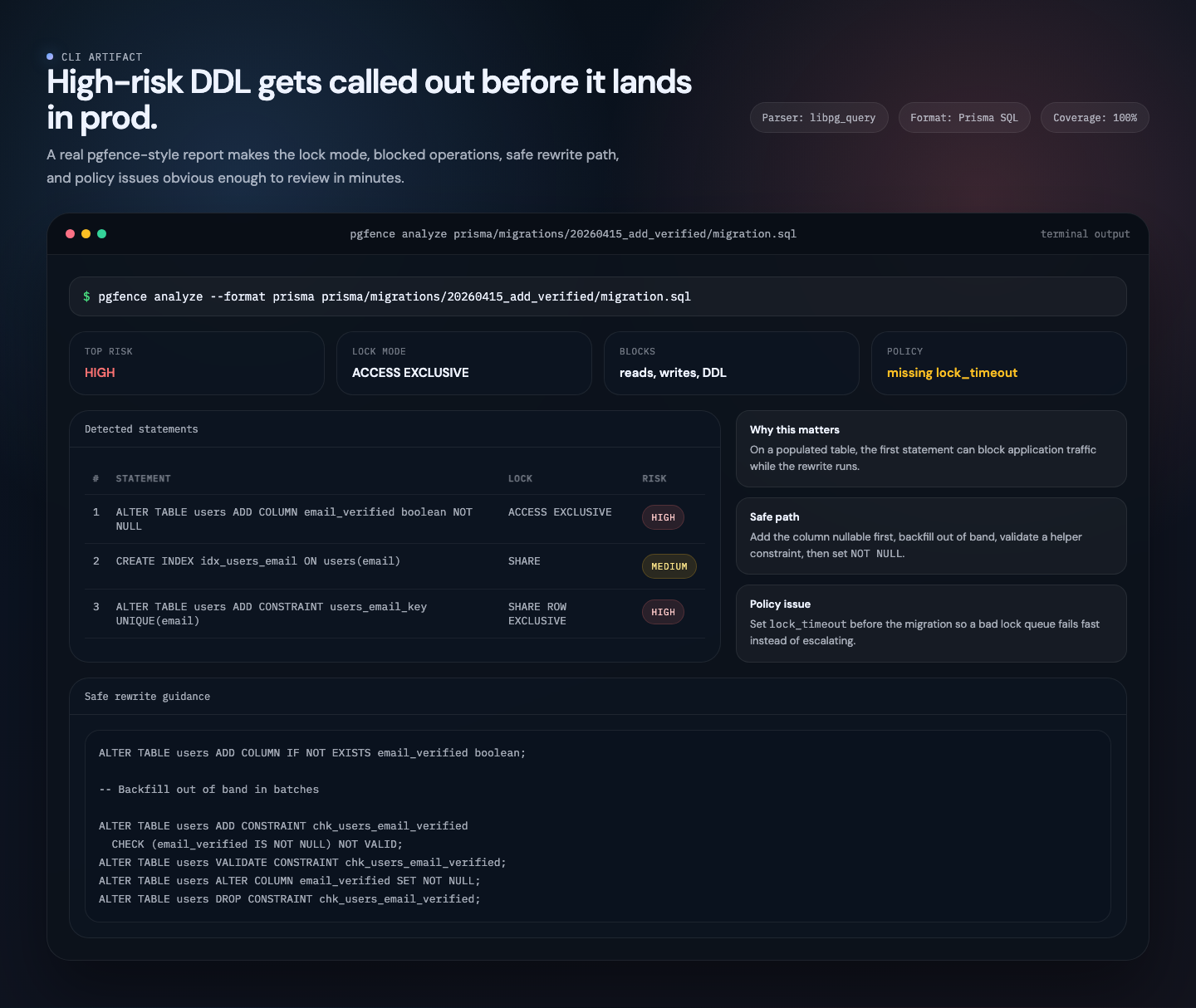
A risky migration becomes a reviewable artifact in one command.
Lock mode, blocked operations, rewrite guidance, and policy issues stay in one place, which makes the migration conversation concrete before merge.
Run the CLI →Free and open source
pgfence is an open-source Postgres migration safety CLI that maps every DDL statement to its lock mode, blocked operations, and a safe rewrite recipe.
Every DDL statement in Postgres takes a lock. Some block all reads and writes for minutes. pgfence uses PostgreSQL's actual parser to map each statement to its exact lock mode, with safe rewrite recipes you can paste into the next migration. CLI, LSP, GitHub Action, and ORM extractors all open source.
Migration formats
pgfence pulls the SQL out of your migration files no matter how they are written. TypeORM migrations are scanned for queryRunner.query() calls. Prisma's migration.sql files are read directly. Knex and Kysely migrations support literal SQL plus focused schema-builder subsets. Sequelize migrations are parsed for queryInterface calls. Drizzle's generated SQL snapshots are handled the same way. Plain .sql files need no extractor. Six ORMs plus raw SQL, seven input formats, one rule catalog.
The CLI, LSP, docs, GitHub Action, and reporting outputs are open source and free forever. Organizations that want approvals and policy enforcement can join the design partner program while the governance layer is shaped with real production migrations.
A free OSS analyzer today, plus a private design partner program for teams that own production migration risk. No fixed governance pricing yet.
How access worksThe governance layer is exploratory and only available through the design partner program. We are shaping approvals, shared policies, and audit history with teams that already have real migration review pain.
About the programNo production database credentials, explicit trust boundaries, and a clear disclosure path for security and privacy review.
Read trust docsQuestions about the design partner program, governance direction, or a security questionnaire? Reach us directly.
Contact usALTER TABLE users
ADD COLUMN email_verified boolean NOT NULL;
CREATE INDEX idx_users_email
ON users(email);pgfence catches it before your users do
| # | Statement | Lock Mode | Blocks | Risk | Message |
|---|---|---|---|---|---|
| 1 | ALTER TABLE users ADD COLUMN email_verified BOOLEAN NOT NULL | ACCESS EXCLUSIVE | reads, writes, DDL | HIGH | ADD COLUMN "email_verified" with NOT NULL but no DEFAULT, fails on non-empty tables |
| 2 | CREATE INDEX idx_users_email ON users(email) | SHARE | writes, DDL | MEDIUM | CREATE INDEX without CONCURRENTLY, blocks writes for duration |
    ALTER TABLE users ADD COLUMN IF NOT EXISTS email_verified boolean;
    -- Backfill out-of-band in batches
    ALTER TABLE users ADD CONSTRAINT chk_nn CHECK (email_verified IS NOT NULL) NOT VALID;
    ALTER TABLE users VALIDATE CONSTRAINT chk_nn;
    ALTER TABLE users ALTER COLUMN email_verified SET NOT NULL;
ALTER TABLE users DROP CONSTRAINT chk_nn; Captured workflow
These images are captured from local demo artifacts built around the current CLI, editor, and PR review flows, so the homepage shows what the workflow looks like in practice.
Lock mode, blocked operations, rewrite guidance, and policy issues stay in one place, which makes the migration conversation concrete before merge.
Run the CLI →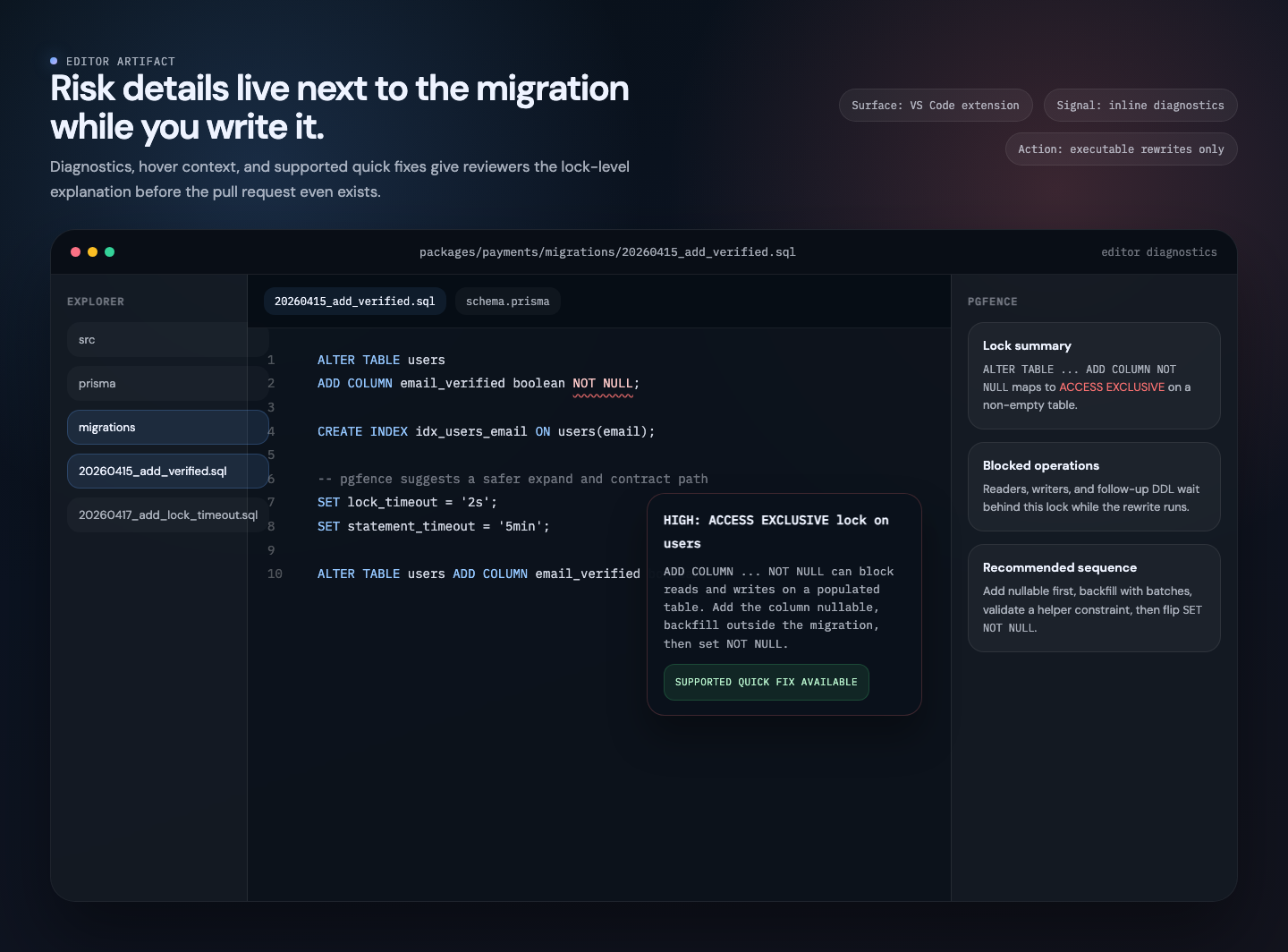
Inline diagnostics and hover details help reviewers understand what a statement blocks before the pull request stage.
Open editor docs →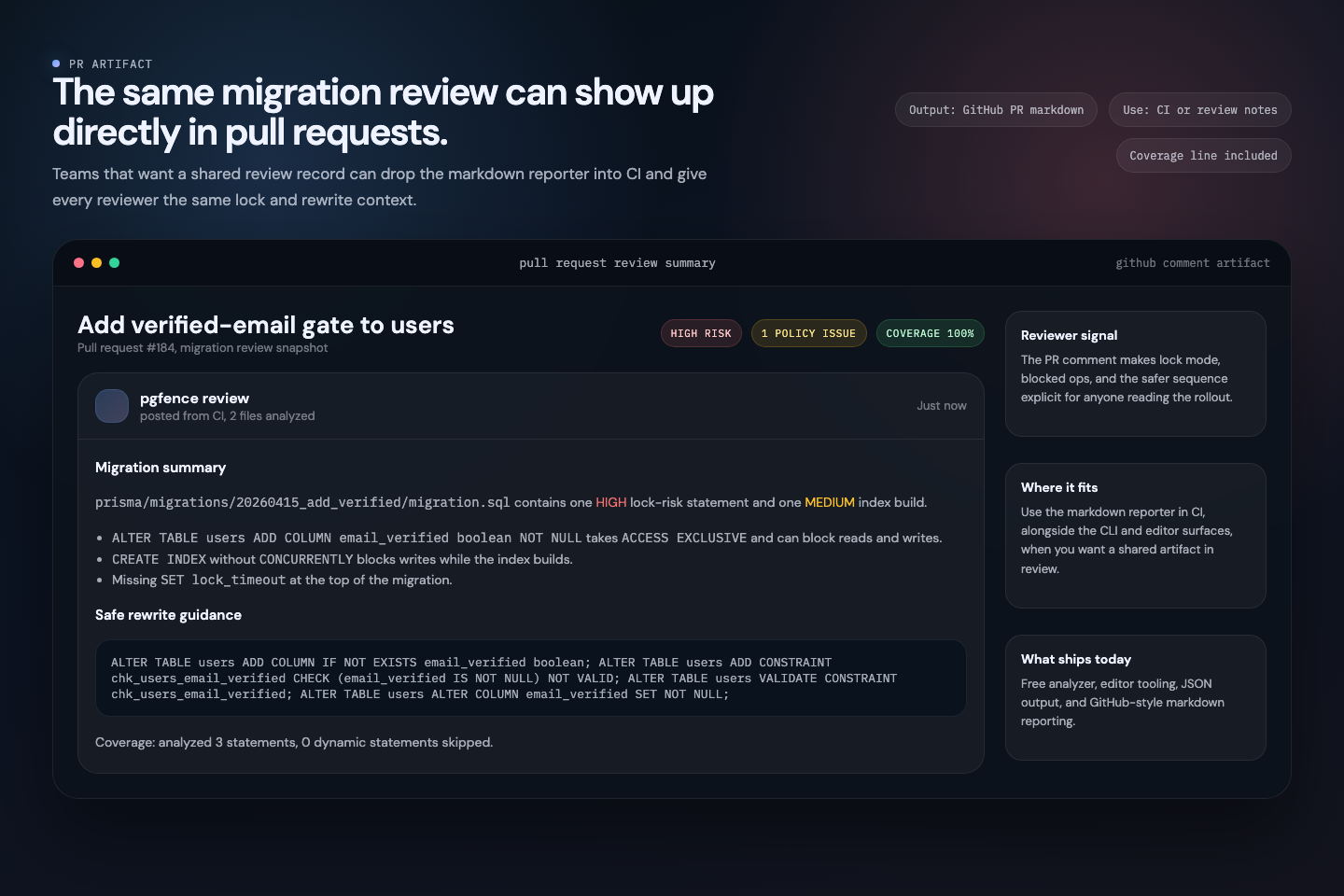
Teams can keep the markdown output in CI so the reviewer sees the same findings, coverage line, and safer path without context switching.
See output formats →Uses libpg_query, PostgreSQL's own parser compiled to a C library. Full AST, not regex pattern matching.
Maps each statement to its exact lock mode, blocked operations, and risk level. Optionally adjusts by table size.
Apply a small allowlist of mechanical SQL fixes, or scaffold the files for a multi-step expand and contract rollout.
Built on libpg_query, the same C library Postgres uses internally. Full AST for every statement, not regex guessing.
Analyzes migration files statically. Optional table-size scoring uses a JSON stats snapshot, never needs direct DB access.
--fix applies mechanical raw SQL fixes. --fix --split creates reviewable sibling files for supported multi-step recipes without changing the original migration.
Extracts SQL from TypeORM, Prisma, Knex, Kysely, Sequelize, and Drizzle migrations. Plain .sql files work out of the box. Six ORMs plus raw SQL, seven input formats in total.
Every check maps to a specific PostgreSQL lock mode.
DROP TABLETRUNCATETRUNCATE CASCADEREINDEX SCHEMA/DATABASEDROP SCHEMADROP SCHEMA CASCADEDROP DATABASEADD COLUMN NOT NULL without safe patternADD COLUMN DEFAULT <volatile>ADD COLUMN GENERATED STOREDALTER COLUMN TYPE cross-family rewriteADD FOREIGN KEY without NOT VALIDADD UNIQUE without concurrent indexADD EXCLUDE constraintDROP COLUMNRENAME TABLEVACUUM FULLREINDEX TABLE / INDEXATTACH PARTITIONDETACH PARTITIONREFRESH MATERIALIZED VIEWADD PRIMARY KEY without concurrent indexALTER DOMAIN ADD CONSTRAINTDELETE without WHERECLUSTER new in 0.6REPLICA IDENTITY FULL new in 0.6ENABLE ROW LEVEL SECURITY new in 0.6DISABLE ROW LEVEL SECURITY new in 0.6INHERIT / NO INHERIT new in 0.6CREATE INDEX without CONCURRENTLYDROP INDEX without CONCURRENTLYSET NOT NULL without constraintADD CHECK without NOT VALIDALTER TYPE ADD VALUE (PG < 12)CREATE TRIGGERDROP TRIGGERREFRESH ... CONCURRENTLYCONCURRENTLY inside transactionlock_timeoutstatement_timeoutREFRESH ... WITH NO DATACREATE DOMAIN with constraintsADD COLUMN DEFAULT <constant> (PG11+)ALTER TYPE ADD VALUE (PG12+)ADD UNIQUE USING INDEXRENAME COLUMN (PG14+)DETACH PARTITION CONCURRENTLYENABLE TRIGGERDISABLE TRIGGERALTER COLUMN TYPE text/varchar wideningADD PRIMARY KEY USING INDEXVALIDATE CONSTRAINT (standalone)ADD COLUMN ... json (prefer jsonb)integer/int type (prefer bigint)varchar(N) type (prefer text)timestamp without TZ (prefer timestamptz)char(N) type (prefer text)serial type (prefer IDENTITY)CREATE TYPE ... AS ENUM new in 0.6CREATE POLICY new in 0.6Works with your stack
See lock modes, risk levels, and safe rewrites as you type. One-click quick fixes appear for supported executable rewrites.
Warnings and errors appear directly in your SQL files with lock mode and risk level details.
Click the lightbulb when pgfence has a supported executable rewrite for the flagged statement.
Hover over any statement to see its lock mode, what it blocks, and the safe alternative.
Fail the build when a migration exceeds your risk threshold.
Add pgfence to your pipeline in under a minute. Try it on one migration and open an issue with what it missed.


